Showing posts with label design. Show all posts

Tuesday, June 26, 2012

The Beauty of Textures

This is another photo art creation using photos taken of a bouquet of carnations. I merely wanted to take a picture of them to preserve their beauty so my daughter could remember that Valentine’s day gift. I couldn’t photograph them indoors because the lighting just wasn’t right, but when I simply placed them out on the table on our lanai, magic happened. I was able to photograph them like a painting and convey the beauty that my eyes were seeing. However, in adding Kim Klassen’s textures to the image, really turned this piece into art. 


Beauty Fades
© 2012 Cheri Wenger Design Photography
Photo art featuring textures by Kim Klassen.


To see the evolution, you must see the original photo. 


It has a warmth to it, but I love the vintage look of the finished art 
achieved by adding Kim’s Just Blush texture plus some of my own textures 
and quote to it! Check out Texture Tuesdays challenges with Kim. This is her justblush texture:


Here are the two of my own photo textures that I applied to the image that helped to add that dreamy, watercolor look to the image. For those of you not familiar with photoshop, you can layer photos, textures, text and color over photos in varying opacities with different layer style choices to achieve very dramatic or very subtle effects.


The two photo images above were photos taken of the glass block window in our master bath. The third image, below, was a closeup taken of our textured wall. So you see, creativity exists all around us, just waiting to be used and appreciated! 


In the first image, I changed the hue to a sepia tone look. It includes wispy textures from the floral arrangement that sits on the ledge.These are all colored textures, however you can use b&w textures/photos to create effects. Don’t be afraid to experiment & live life creatively!

Here’s a peek at my layers palette in photoshop so you can see the order of the layers used. 

Thursday, June 7, 2012

Fish all day...tell big lies!

This fish themed poster is another addition to my Cheri Wenger Design Photography photo art collection combining my photo image with actions, textures and text. It is such a fun way to combine my design and photographic talents. Here is the finished result...


But here is where it all began..

This is a peek at my original photo shot at Indialantic Beach, 
where all my creative thoughts began!


Next I used a combinations of actions and 
layers in Photoshop to create this look...


Then I combined some yummy textures designed by Kim Klassen for 
her Texture Tuesday Cafe. For this effect I used 2 textures, 
revolution and musiclovin, shown below.


Design © 2012 Cheri Wenger Design Photography

I liked the result, but really wanted to add a quote to turn 
it into a fun work of art! I researched some quotes and 
decided on this one by an unknown author to 
finish the artwork shown above.

If you are interested in purchasing a print or canvas art 
of this, contact me by email and I can get you pricing, 
depending upon the size you would like at artz1@cfl.rr.com.

Saturday, May 12, 2012

A Mother's Day Tribute

This photo art was created as a tribute to all moms...whether you have given birth, adopted or fostered a child, or simply have been thought of in a motherly way. I started off using a photo image taken of an arrangement of carnations given to my daughter Kai on Valentine’s day. See below for a peek at that image so you can appreciate how it was transformed into the artwork you see on the right. I used two great textures that I purchased from Kim Klassen's Bens Collection.

Kim offers a Texture Tuesday challenge which inspires artists and photographers to use her textures creatively. For this piece, “In the Garden”, I wanted to create a painterly, watercolor effect. I used a combination of layers and effects at varying opactities. From the Bens Collection, I chose textures 2 & 6, and selected a quote attributed to Claudia Chandi as my verse.

So how did I create this?
I used Photoshop with my original photo on the main layer, add the textures on top. To make the type more interesting I mixed two fonts and three coordinating shades of colors: a deep olive, dark red and a medium shade of rosey pink. Now take a peek below to see all of the original images that were combined to create this art.


Here is the original photo image...


And here are the two textures from Kim Klassen’s Bens Collection that I used...


Check out her Texture Tuesday Cafe,
and be inspired!

Happy Mother’s Day to all the great moms out there who daily work your mommy magic!


Sunday, January 15, 2012

Color Focus for 2012

Part of Living Life Creatively means that I like to try new things for inspiration and tackle new design challenges. This year I have decided to create a single color palette from which I will create all of my colored clip art designs...or at least I will attempt not to break my own rules! ;)
My focus this year is on color combinations. Part of this means that I will share favorite color combinations for you to try out in your design projects. Some of these may be outside of my own 2012 color palette, but nonetheless, nice combinations for color inspiration for crafting, fashion and home decor.

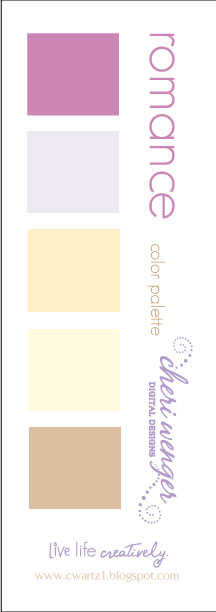
With Valentine's day around the corner, my first color group is titled the Romance color palette. Can't wait to see what you create with this color group. Email me at artz1@cfl.rr.com with your photos and I will share them here, or leave me a comment with a link to your blog post. Happy creating! 


Oh, and I have tweeked the design for my tag line. I will share a peek at that below.

I have lots of new plans in store as I am tackling working on two websites...
one for my overall design work and one for my photography.
Both are still in the baby stage of preliminary designs.
It will be so fulfilling to be able to tie together all of the ways that I


Wednesday, January 5, 2011

Project 365 Challenge: Day 3/Photography Logo & Album

If you know me you know I am one to never tread lightly into a project. I go in enthusiastically and take on big challenges. Ask my husband about the tile design in the basement of our former house...a weekend do-it-yourself project that I thought may end in divorce. It was our first experience at laying and cutting tile, the room was 14 x 20 something (not a small area) and I designed a border design with inner tile being laid as a diamond pattern. Let's just say I compromised on just having a border which to center in the room was a big enough first time challenge. The end result was gorgeous and after nursing sore backs and achey knees, we decided we would probably hire someone to do it the next time around.

For day three's challenge, I revisited photos that I had taken last year during our visit to Philly in the midst of the big snowstorm of 2009. I had the unique experience to sneak out early in the morning with my camera and photograph many cool snowy scenes. I have been wanting to share these beautiful images with everyone, but needed to do some photo editing. So that is what I did for day 3, however, it evolved into a much bigger project you see. Now I had to design a watermark logo for my photography, resize and watermark all the files! You see the snowball effect of that this gal’s ambition can have!

Unfortunately, I don’t have all the images watermarked, but I do have a logo design I can share. 


I promise to share the album as soon as I have it web-ready! 
I will give you one little sneak peak at what is in the album.


Saturday, January 1, 2011

Project 365 Personal Challenge


During one of the segments of our whirlwind trip to Georgia that to truly live life creatively, I needed to do a little experiment. You see, I get such a thrill when I am using my mind creatively. It lifts my spirit, boosts my energy and makes me feel like I can tackle anything. So why not want feel like that all year long? This is why I created my Project 365 Personal Challenge to allow myself to experience a little piece of that in each day of the new year.

Are you maybe thinking of joining in on this challenge? I really hope so! Hang in there with me and let's give this a try. The project doesn't even have to be something big...it can even be a tag or a small element that will later be incorporated into a bigger project. So don't be intimidated!!!


So what exactly does this involve? For me, it will be doing something creative each day, i.e. making a card, gift, scrapbook page, designing a new set or elements of a set — anything other than a customer’s project or work assignment...something that fills my jar back up! Now I know your mind may already have thought of two or three reasons that this isn’t possible to do each and every day, but it is, if you get a little bit creative! You know most of us crafters are night owls, so if you stay up late and get on a roll, you can knock out two projects in one session! Say you’re sick and not feeling up to something big, doodle or write about how you are feeling, crumble up the paper and tack it up as a reminder of how much better you feel the next day. On a family vacation and don't have your computer, drawing or crafting supplies with you? This happened to me on our recent trip. I had all this creative energy and no where to put it...not a notepad or marker to be found in the dark abyss of my purse, so I grabbed one of the magazines I brought along and started doodling in ballpoint pen on the pages. I threw perfection out the window with each bump in the road and I will be turning these creations into a new set or two! Another idea while traveling is to take out your camera and shoot a picture from an interesting perspective or from a view that you don't even see what it is you're photographing, but the color and texture becomes art. You see, it is possible, so come join me as I will post the results of my Project 365 Personal Challenge here on my blog! Comment on my blog and leave me a link back to yours. I would love to see how you live life creatively!